>> ESLint: 잠재적인 버그를 발견하고, 코드 스타일(들여쓰기, 공백 등)을 검사함. 뿐만 아니라 코드의 오류, 잘못된 패턴을 찾아냄.
>> Prettier: 오로지 코드의 포맷팅을 다루는 도구. 코드가 일관된 형식을 갖추도록 한다. 매우 엄격하게 코드를 재포맷함.
=> ESLint와 Prettier의 코드 스타일 규칙이 충돌할 수 있다.
✅ Prettier와 ESLint의 중복 해결
"eslint-config-prettier" : Prettier와 충돌하는 ESLint의 모든 스타일 규칙을 비활성화한다. Prettier가 코드 포맷팅을 전담하도록 한다. ESLint는 코드 스타일 규칙과 관련된 경고를 출력하지 않는다.
{
  "extends": [
    "eslint:recommended",
    "plugin:react/recommended",
    "plugin:@typescript-eslint/recommended",
    "prettier" // eslint-config-prettier가 Prettier와 충돌하는 규칙을 비활성화
  ]
}
"eslint-plugin-prettier" : Prettier의 포맷팅 규칙을 ESLint의 규칙으로 통합시켜, ESLint가 Prettier의 규칙에 따라 코드를 검사하도록 한다. Prettier의 포맷팅 규칙에 맞지 않는 부분이 ESLint의 오류로 나타나게 된다.
{
  "extends": [
    "eslint:recommended",
    "plugin:react/recommended",
    "plugin:@typescript-eslint/recommended",
    "prettier" // eslint-config-prettier로 Prettier와 충돌하는 규칙 비활성화
  ],
  "plugins": [
    "react",
    "@typescript-eslint",
    "prettier" // eslint-plugin-prettier로 Prettier 규칙을 ESLint에 통합
  ],
  "rules": {
    "prettier/prettier": "error" // Prettier 규칙을 ESLint 오류로 보고
  }
}
rules:{"prettier/prettier" : "error"}
=> Prettier 규칙을 위반하는 코드를 감지하고 에러로 처리
*/.{ts,tsx}: 루트 디렉토리 바로 아래에 있는 모든 디렉토리 안에서, 확장자가 .ts, .tsx인 모든 파일
project-root/
├── src/
│   ├── App.tsx
│   ├── index.ts
│   └── components/
│       └── Button.tsx
├── test/
│   ├── test.tsx
│   └── utils.ts
└── other.ts
src/App.tsx, src/index.ts, test/test.tsx, test/utsils.ts가 해당된다. other.ts와 src/components/Button.tsx는 해당 안 됨.
**/*.{ts,tsx}: 루트 디렉토리 및 하위 디렉토리에 위치한 확장자가 .ts, .tsx인 모든 파일
project-root/
├── src/
│   ├── App.tsx
│   ├── index.ts
│   └── components/
│       └── Button.tsx
├── test/
│   ├── test.tsx
│   └── utils.ts
└── other.ts
src/App.tsx, src/index.ts, src/components/Button.tsx, test/test.tsx, test/utsils.ts, other.ts 전부 해당된다.
import prettierConfig from 'eslint-config-prettier';
import prettier from 'eslint-plugin-prettier';
import reactHooks from 'eslint-plugin-react-hooks';
import reactRefresh from 'eslint-plugin-react-refresh';
import globals from 'globals';
import tseslint from 'typescript-eslint';

export default tseslint.config({
  extends: [
    'airbnb', // Airbnb 기본 설정
    'airbnb-typescript', // Airbnb의 TypeScript 지원 설정
    'plugin:prettier/recommended', // Prettier와 충돌하는 ESLint 규칙을 비활성화
    prettierConfig, // eslint-config-prettier를 사용하여 Prettier와 충돌하는 규칙 비활성화
  ],
  files: ['src/**/*.{ts,tsx}'], // 모든 하위 디렉토리의 .ts, .tsx 파일 대상
  ignorePatterns: ['dist/', 'node_modules/'],
  languageOptions: {
    ecmaVersion: 2020,
    globals: globals.browser,
    parserOptions: {
      project: ['./tsconfig.node.json', './tsconfig.app.json'],
      tsconfigRootDir: import.meta.dirname,
    },
  },
  plugins: {
    'react-hooks': reactHooks,
    'react-refresh': reactRefresh,
    prettier: prettier, // Prettier 플러그인 추가
    // Airbnb 관련 플러그인들은 자동으로 포함됨
  },
  rules: {
    ...reactHooks.configs.recommended.rules,
    'react-refresh/only-export-components': [
      'warn',
      { allowConstantExport: true },
    ],
    'prettier/prettier': 'warn', // Prettier 규칙을 ESLint 규칙으로 추가
    // 여기에서 Airbnb 규칙을 필요에 따라 덮어쓸 수 있습니다.
  },
});
'plugin:prettier/recommended' 설정만 있으면 된다.
import prettier from 'eslint-plugin-prettier';
import prettierConfig from 'eslint-config-prettier';
사용하여 추가로 설정할 필요 없음.
import globals from 'globals';
import tseslint from 'typescript-eslint';

export default tseslint.config({
  extends: [
    'airbnb', // Airbnb 기본 설정
    'airbnb-typescript', // Airbnb의 TypeScript 지원 설정
    'plugin:prettier/recommended', // Prettier와 충돌하는 ESLint 규칙을 비활성화
  ],
  files: ['src/**/*.{ts,tsx}'], // 모든 하위 디렉토리의 .ts, .tsx 파일 대상
  ignorePatterns: ['dist/', 'node_modules/'],
  languageOptions: {
    ecmaVersion: 2020,
    globals: globals.browser,
    parserOptions: {
      project: ['./tsconfig.node.json', './tsconfig.app.json'],
      tsconfigRootDir: import.meta.dirname,
    },
  },
  plugins: {
    // Airbnb 관련 플러그인들은 자동으로 포함됨
  },
  rules: {
    // 여기에서 Airbnb 규칙을 필요에 따라 덮어쓸 수 있습니다.
  },
});
최소화 시킨 결과.
Common JS 시작~~~
https://www.jadru.com/eslint-920-is-not-ready
무턱대고 ESLint 최신버전 설치하면 고생하는 이유 v9.2.0
무슨 라이브러리든 최신버전만 쓰면 고생한다.
www.jadru.com
ESLint 9.x.x 호환 잘 안 됨. Airbnb 지원도 안 됨.
=> 8.0.1 사용.
module.exports = {
  env: {
    browser: true,
    es2021: true,
  },
  extends: [
    'plugin:react/recommended',
    'airbnb',
  ],
  parser: '@typescript-eslint/parser',
  parserOptions: {
    ecmaFeatures: {
      jsx: true,
    },
    ecmaVersion: 15,
    sourceType: 'module',
  },
  plugins: ['react', '@typescript-eslint'],
  rules: {},
};
- Vite 프로젝트 생성 (React, TypeScript + SWC)
"@eslint/js": "^9.9.0",
"@types/react": "^18.3.3",
"@types/react-dom": "^18.3.0",
"@vitejs/plugin-react-swc": "^3.5.0",
"eslint": "9.8.0",
"eslint-plugin-react-hooks": "^5.1.0-rc.0",
"eslint-plugin-react-refresh": "^0.4.9",
"globals": "^15.9.0",
"typescript": "^5.5.3",
"typescript-eslint": "^8.1.0",
"vite": "^5.4.0"
에서 eslint 버전 다운그레이드, eslint-plugin-react-hooks 버전 정확하게 수정 필요.
- ESLint 패키지 추가 및 ESLint 스타일 설정(style, esm, react, Yes, Browser, guide, Airbnb, JavaScript, No)
"eslint": "8.0.1", (버전 수정)
yarn add eslint@8.0.1
yarn eslint --init
마지막 npm으로 설치하는 패키지 복사해서 yarn --dev로 설치.
module.exports = {
  env: {
    browser: true,
    es2021: true,
  },
  extends: ['plugin:react/recommended', 'airbnb'],
  parser: '@typescript-eslint/parser',
  parserOptions: {
    ecmaFeatures: {
      jsx: true,
    },
    ecmaVersion: 15,
    sourceType: 'module',
  },
  plugins: ['react', '@typescript-eslint'],
  settings: {
    react: {
      version: 'detect', // React 버전을 자동으로 감지
    },
  },
  rules: {},
};
생성된 .eslintrc.js 파일
- 타입스크립트 ESLint
"@typescript-eslint/eslint-plugin": "5.0.0", (버전 수정)
"@typescript-eslint/parser": "5.0.0", (버전 수정)
"typescript": "4.4.4", (버전 수정)
동일한 버전 설치 후,
extends: ['plugin:@typescript-eslint/recommended'], parser: '@typescript-eslint/parser', plugins: ['@typescript-eslint'] 설정
- Airbnb ESLint
"eslint-config-airbnb": "^19.0.4", // airbnb 필수 패키지
"eslint-plugin-import": "^2.29.1",
"eslint-plugin-jsx-a11y": "^6.9.0",
"eslint-plugin-react": "^7.35.0",
"eslint-plugin-react-hooks": "^4.6.2",
설치 후,
extends: ['airbnb'] 설정
- ESLint / Prettier 충돌 해결
"prettier": ^3.3.3, // Prettier 필수 패키지
"eslint-config-prettier": "^9.1.0",
"eslint-plugin-prettier": "^5.2.1",
설치 후,
extends: ['plugin:prettier/recommended'] 설정
🤔🤔🤔 peer dependency 문제 발생
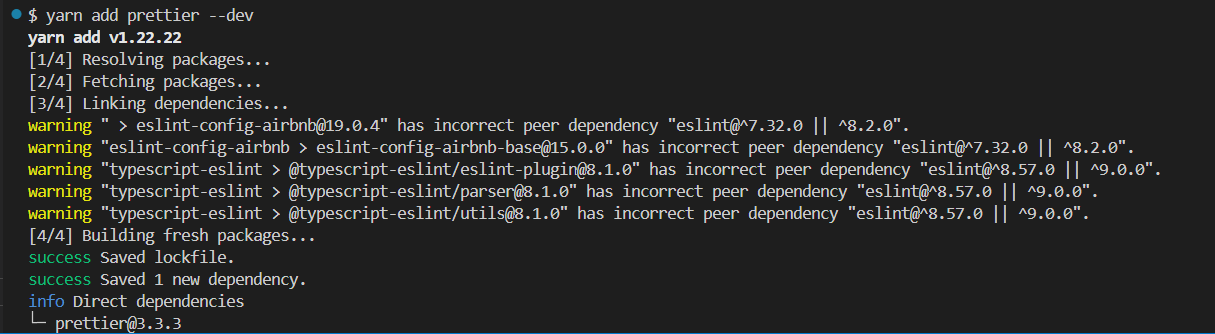
eslint 버전에 호환되지 않음. eslint가 8.0.1이라서 발생하는 문제. But, Airbnb style을 지원받기 위해 8.0.1을 사용해야만 함.
=> 나머지 패키지들을 다운그레이드 하는 방향으로...
✅ 완성본
module.exports = {
  env: {
    browser: true,
    es2021: true,
  },
  extends: [
    'plugin:react/recommended',
    'airbnb',
    'plugin:@typescript-eslint/recommended',
    'plugin:prettier/recommended',
  ],
  parser: '@typescript-eslint/parser',
  parserOptions: {
    ecmaFeatures: {
      jsx: true,
    },
    ecmaVersion: 15,
    sourceType: 'module',
  },
  plugins: ['react', '@typescript-eslint'],
  rules: {
    'react/react-in-jsx-scope': 'off',
    'react/jsx-filename-extension': [
      1,
      { extensions: ['.js', '.jsx', '.ts', '.tsx'] },
    ],
    'no-console': process.env.NODE_ENV === 'production' ? 'error' : 'off',
  },
};
// prettier.config.cjs
module.exports = {
semi: true,
singleQuote: true,
jsxSingleQuote: false,
trailingComma: 'es5',
printWidth: 80,
tabWidth: 2,
useTabs: false,
bracketSpacing: true,
arrowParens: 'avoid',
};{
"name": "seaya-web",
"private": true,
"version": "0.0.0",
"type": "module",
"scripts": {
"dev": "vite",
"build": "tsc -b && vite build",
"lint": "eslint .",
"preview": "vite preview"
},
"dependencies": {
"@vitejs/plugin-react-swc": "^3.5.0",
"react": "^18.3.1",
"react-dom": "^18.3.1",
"vite": "^5.4.0"
},
"devDependencies": {
"@eslint/js": "^9.9.0",
"@types/react": "^18.3.3",
"@types/react-dom": "^18.3.0",
"@typescript-eslint/eslint-plugin": "5.0.0",
"@typescript-eslint/parser": "5.0.0",
"eslint": "8.0.1",
"eslint-config-airbnb": "^19.0.4",
"eslint-config-prettier": "^9.1.0",
"eslint-plugin-import": "^2.29.1",
"eslint-plugin-jsx-a11y": "^6.9.0",
"eslint-plugin-prettier": "^5.2.1",
"eslint-plugin-react": "^7.35.0",
"eslint-plugin-react-hooks": "^4.6.2",
"eslint-plugin-react-refresh": "^0.4.9",
"globals": "^15.9.0",
"prettier": "^3.3.3",
"typescript": "4.4.4",
"typescript-eslint": "^8.1.0"
}
}
'프로젝트 > 스마트해양물류 ✖ ICT멘토링' 카테고리의 다른 글
| [SEAYA] 트러블 슈팅 모달창 (0) | 2024.10.13 |
|---|---|
| [SEAYA] Jira + Bitbucket, GitHub PR 추적, 트러블 슈팅 (0) | 2024.09.14 |
| [SEAYA] Vite + React + TS (Yarn 패키지 매니저) (0) | 2024.07.25 |
